How can I control which scanned or saved attachemnts can be deleted or viewed per user?

+1 vote
807 views

1 Answer

answered Jun 16, 2015 by Admin
 
Best answer

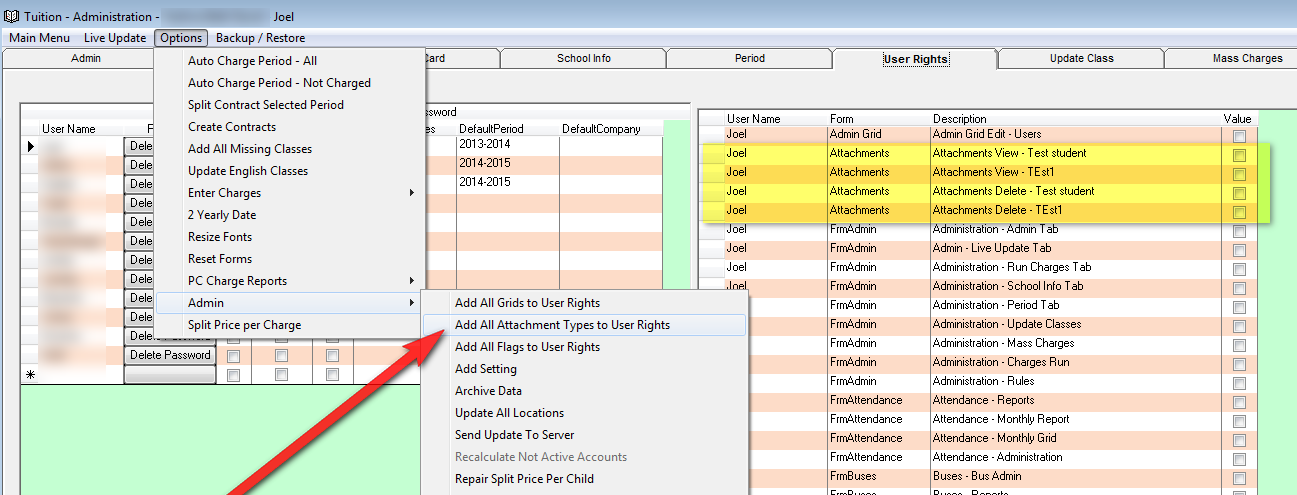
You now have the option of choosing each attachment type if it can be viewed or deleted. To add attachments rights to your user rights option go to the Options Menu in the Administration Screen. In the Admin sub menu click on "Add all Attachment Types to User Rights". This will add all your Scanned Documents types you setup to the user rights option. If at a later date you add more attachment types you would need to click this menu again.

As you see in the picture below you will now have two option for each attachment type. One is for the right to delete or overwrite an existing attachment. The other is to allow viewing of the attachment thru the view button.



commented Jun 21, 2015 by BYBZ
thanks,

will this override the permissions everytime we reapply after adding new attachments?
commented Jun 21, 2015 by Admin
No. It will just add the new user rights.

Let's Welcome our New Members

  • Wck of Willowbrook Community Kollel - Feb 17, 2026

  • Mr Y greenwald of Tov vchesed Rachmistrivka - Feb 10, 2026

  • Kritzler YS of pupa - Feb 09, 2026

  • Shimon of Vehareinu Skver - Feb 09, 2026

  • Gutwein of Lakefront - Feb 08, 2026

  • dgross of yeshiva orchos chaim - Feb 03, 2026

  • SrulyF of JLS - Feb 02, 2026

  • Flor of Little Munchkins Playgroup 56 Inc - Jan 29, 2026

  • avneitzedek13 of Avnei Tzedek Shull - Jan 29, 2026

...