Tuition: How can I have the name of recent accounts displayed in hebrew

+1 vote
568 views

1 Answer

answered Aug 24, 2020 by YakovKantor
edited Dec 14, 2020 by YakovKantor
 
Best answer

Added (08/24/20)

Right click on the Recent Account panel and unhide the HebrewName column. (You can have both english and hebrew at the same time)
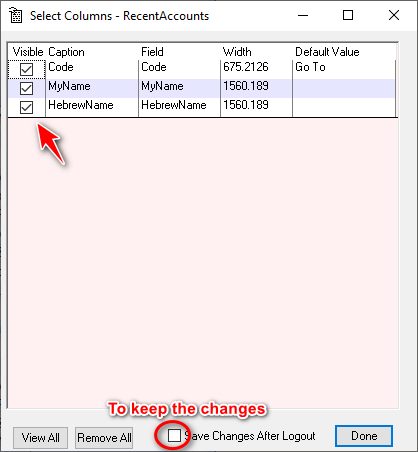
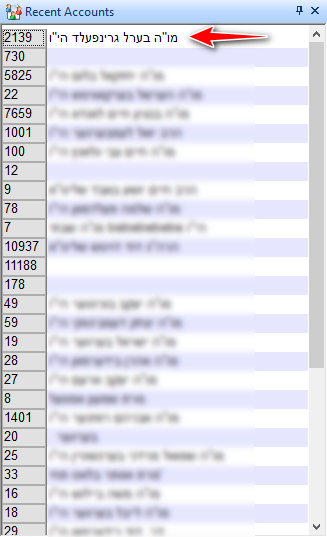


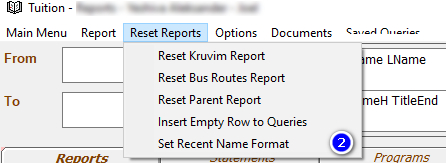
To set the name format.

Select an English and Hebrew name format



Then go to Reset Reports > Set Recent Name Format


commented Dec 13, 2020 by Chaimshiah
this works only on the main screen, but not on the upper right dropdown while in account.

Let's Welcome our New Members

  • Wck of Willowbrook Community Kollel - Feb 17, 2026

  • Mr Y greenwald of Tov vchesed Rachmistrivka - Feb 10, 2026

  • Kritzler YS of pupa - Feb 09, 2026

  • Shimon of Vehareinu Skver - Feb 09, 2026

  • Gutwein of Lakefront - Feb 08, 2026

  • dgross of yeshiva orchos chaim - Feb 03, 2026

  • SrulyF of JLS - Feb 02, 2026

  • Flor of Little Munchkins Playgroup 56 Inc - Jan 29, 2026

...
