Attachment User Rights

0 votes
656 views
asked May 3, 2021 in New Feature by YakovKantor
recategorized May 3, 2021 by YakovKantor

1 Answer

answered May 3, 2021 by YakovKantor
selected May 3, 2021 by YakovKantor
 
Best answer


This feature was added a long time ago but was never posted.

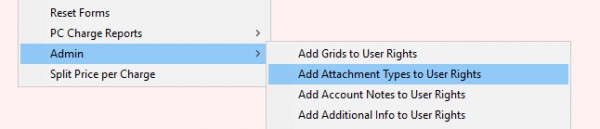
To add all attachments rights go to Administration > Options > Admin > Add Attachment Types to User Rights.


How it works:

After adding the user rights all non admin users will not be able to change or open the attachment. However they will still see the attachment in the list.

The user rights gives 2 options to each attachment type, view and edit.

The user rights can only be given on attachment notes and not on a category.

Any time a new attachment type is added to the list you must re-run  "Add Attachment Types to User Rights". Current users not will lose existing rights it will just add new ones

commented Dec 12, 2024 by zecheryochanan
Can a option to have rights to all attachments be added, (that a user can get rights automatic to all attachments)

Thank you

Shimon Balsam

Let's Welcome our New Members

  • Wck of Willowbrook Community Kollel - Feb 17, 2026

  • Mr Y greenwald of Tov vchesed Rachmistrivka - Feb 10, 2026

  • Kritzler YS of pupa - Feb 09, 2026

  • Shimon of Vehareinu Skver - Feb 09, 2026

  • Gutwein of Lakefront - Feb 08, 2026

  • dgross of yeshiva orchos chaim - Feb 03, 2026

  • SrulyF of JLS - Feb 02, 2026

  • Flor of Little Munchkins Playgroup 56 Inc - Jan 29, 2026

...