Mail Merge for Applicants (Or any program)

0 votes
839 views

1 Answer

answered Mar 8, 2016 by Admin
selected Mar 8, 2016 by Admin
 
Best answer

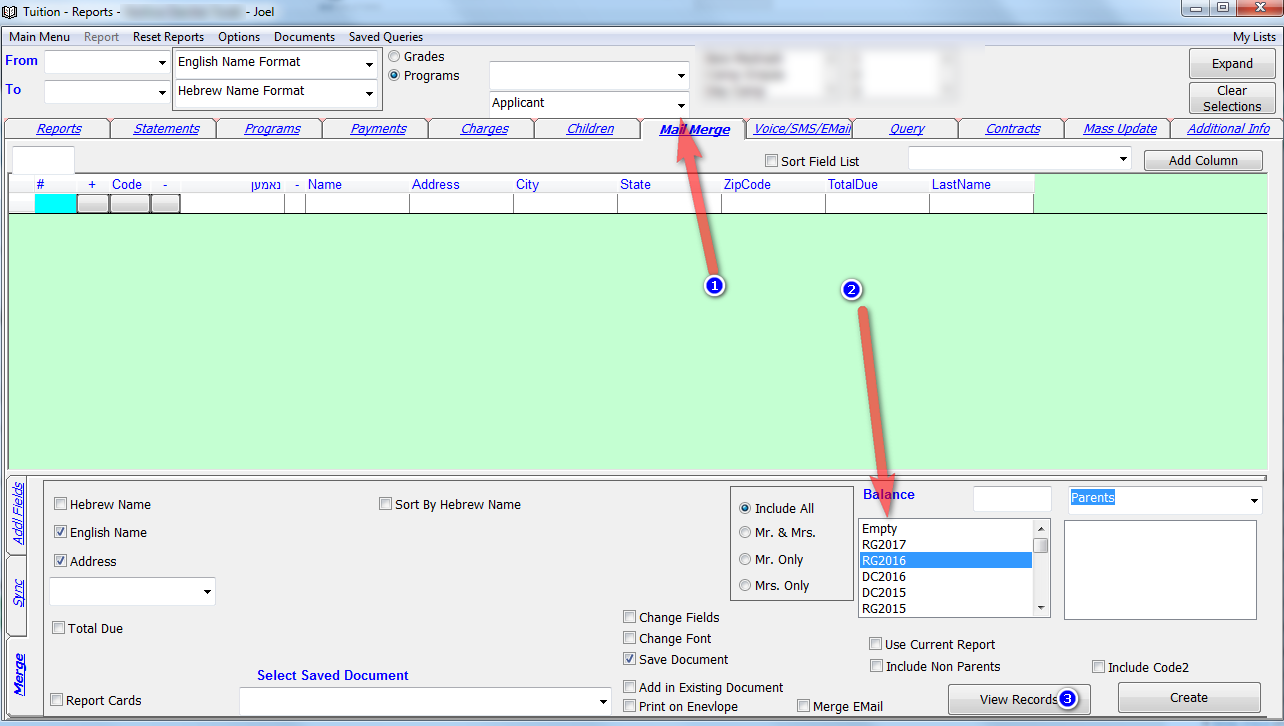
You can now choose a program from the top of the screen and the Mail Merge screen will show only Parents and Children from that program.

So lets say you want to create labels for Applicants you need to select Applicant on top and choose the period on bottom on click on view records. If your program periods are different than regular periods you will find the program periods on the bottom of the period list.



commented Jul 18, 2016 by mbs
can i get the program class in mail merge?
commented Jul 18, 2016 by Admin
You need to select the period from the bottom. Not from the top. Reread the above instructions.
commented Jul 18, 2016 by mbs
got it. Thank you!

Let's Welcome our New Members

  • Wck of Willowbrook Community Kollel - Feb 17, 2026

  • Mr Y greenwald of Tov vchesed Rachmistrivka - Feb 10, 2026

  • Kritzler YS of pupa - Feb 09, 2026

  • Shimon of Vehareinu Skver - Feb 09, 2026

  • Gutwein of Lakefront - Feb 08, 2026

  • dgross of yeshiva orchos chaim - Feb 03, 2026

  • SrulyF of JLS - Feb 02, 2026

  • Flor of Little Munchkins Playgroup 56 Inc - Jan 29, 2026

...