Keyboard shortcuts for searching in the Accounts screen.

+1 vote
1,086 views
asked Mar 4, 2015 in How To by Admin
reopened Nov 30, 2017 by Admin

1 Answer

answered Nov 30, 2017 by Admin
 
Best answer

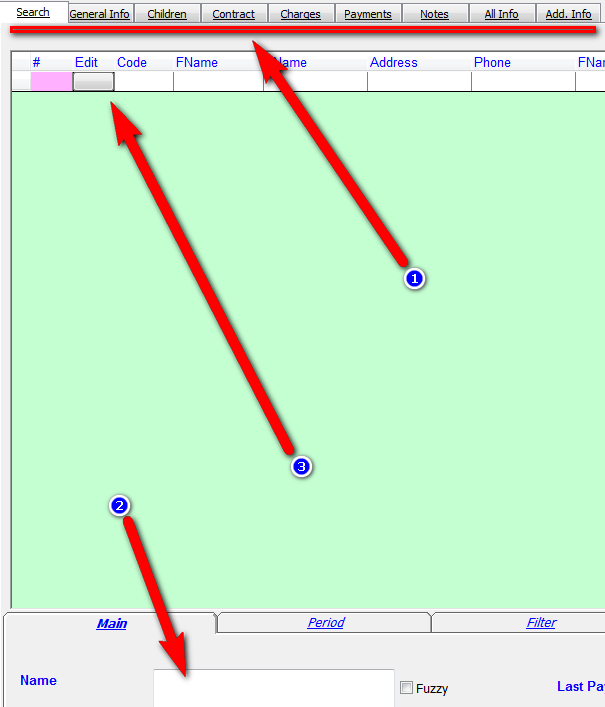
1. All tabs can be accessed by using the Alt+the first letter of the tab (Except Additional Info tab which is Alt+I). So for example to go to the search tab press Alt+S.

2. To start a new search press Ctrl+S. Once the grid returns the results you can use the up and down arrown on your keyboard to scroll thru the list.

3. Press Space to select the current account in the grid. You can press Alt+S to return to the search results.

 

commented Jan 16, 2025 by moshekmtd
עס איז דא א שארטקאט צו סערטשן אין אידיש ?
commented Jan 17, 2025 by Admin
Yes. Look in the search menu and you will see all shortcuts.
commented Jan 17, 2025 by moshekmtd
איך רעד פון די סערטש

נישט פון די דראפ דאן

ביי ענגליש איז עס CTRL S
commented Jan 17, 2025 by Admin
Added in Fundraising (version after 1/17/25) ctrl-Q
commented Jan 17, 2025 by moshekmtd
יישר כח

Let's Welcome our New Members

  • Wck of Willowbrook Community Kollel - Feb 17, 2026

  • Mr Y greenwald of Tov vchesed Rachmistrivka - Feb 10, 2026

  • Kritzler YS of pupa - Feb 09, 2026

  • Shimon of Vehareinu Skver - Feb 09, 2026

  • Gutwein of Lakefront - Feb 08, 2026

  • dgross of yeshiva orchos chaim - Feb 03, 2026

  • SrulyF of JLS - Feb 02, 2026

  • Flor of Little Munchkins Playgroup 56 Inc - Jan 29, 2026

  • avneitzedek13 of Avnei Tzedek Shull - Jan 29, 2026

...