Name Formats - "and" instead of "&"

0 votes
987 views
asked May 3, 2017 in Tuition and Fundraising by cmcohen
retagged Apr 4, 2022 by yczehn

For the name format options in our reports, can you please change the format that wherever's there an "&" to spell out "and" instead? (for example, instead of Title & TitleW FName LName, Title and TitleW FName LName) 

commented May 3, 2017 by Admin
Will add it as an option. Will post here how to set this option when its done.

1 Answer

answered May 4, 2017 by Admin
selected May 8, 2017 by Admin
 
Best answer

Added.

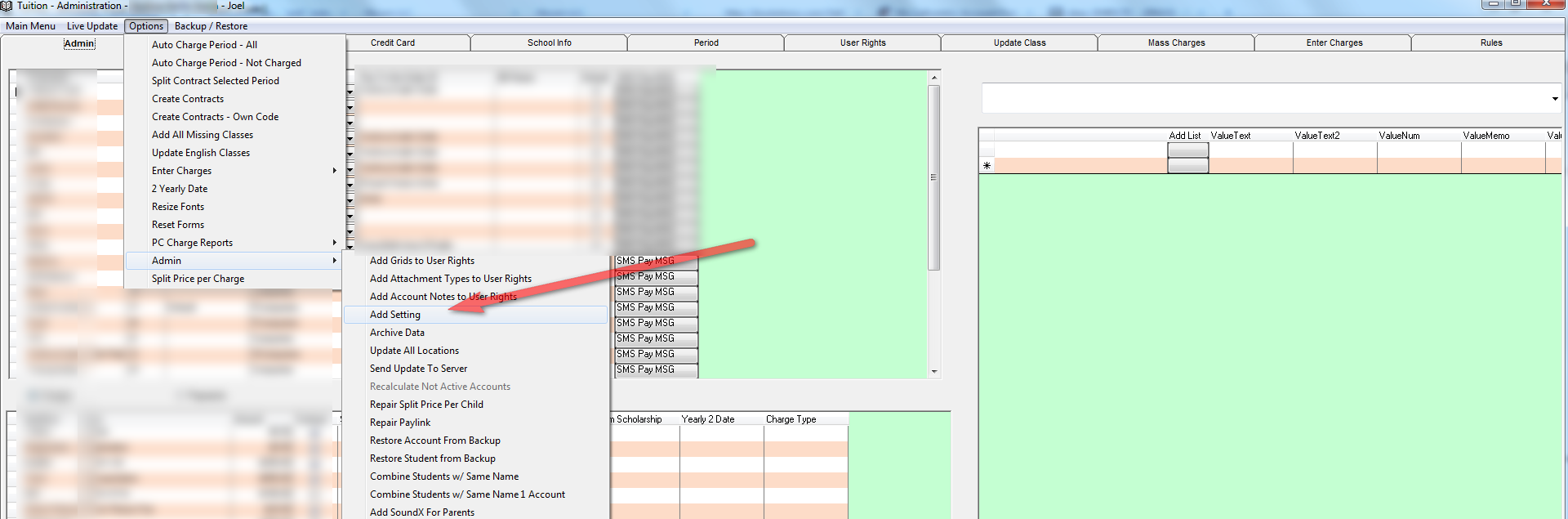
To change from & to and go to the administration screen in Tuition, Choose from the Options Menu - Admin - Add Setting.

By the prompt enter AndForNameSelection and press OK. Choose No for Single User. By the Next Prompt enter and or whatever you want instead of the ampersand &.



commented May 5, 2017 by cmcohen
Thank you!

I completed the admin steps. How would I test that this actually works? I am not so familiar with querying yet.
commented May 5, 2017 by Admin
Just go to the mail merge tab and click on View Records. You should see and in the name column on top.
commented May 8, 2017 by cmcohen
I tried the mail merge and the name format still comes up as &.
commented May 8, 2017 by yczehn

Let's Welcome our New Members

  • Wck of Willowbrook Community Kollel - Feb 17, 2026

  • Mr Y greenwald of Tov vchesed Rachmistrivka - Feb 10, 2026

  • Kritzler YS of pupa - Feb 09, 2026

  • Shimon of Vehareinu Skver - Feb 09, 2026

  • Gutwein of Lakefront - Feb 08, 2026

  • dgross of yeshiva orchos chaim - Feb 03, 2026

  • SrulyF of JLS - Feb 02, 2026

  • Flor of Little Munchkins Playgroup 56 Inc - Jan 29, 2026

  • avneitzedek13 of Avnei Tzedek Shull - Jan 29, 2026

...