Added support for Scan Snap scanners

+2 votes
837 views

1 Answer

answered May 29, 2017 by Admin
selected May 30, 2017 by Admin
 
Best answer

We have added support for Scan Snap scanners by Fujitsu.

To use you would need to add our app in the scan snap applications following these instructions.

https://scansnapcommunity.com/tips-tricks/4021-how-do-i-add-an-application-to-scansnap-manager-pc/

When choosing the application choose the ScanSnapJLS app in our application folder.

You also need to select Scan Snap from the Menu option in the account screen.
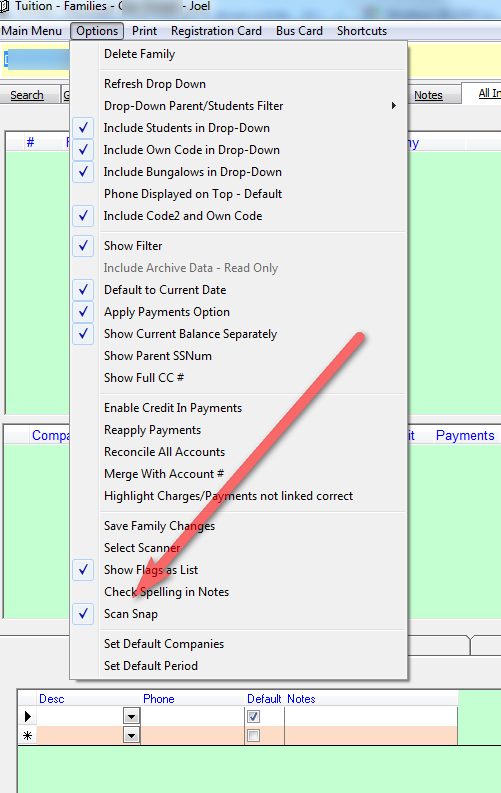


commented May 30, 2017 by zecheryochanan
Thank you very much!
commented Jul 15, 2021 by yczehn

updated Link https://www.pfu.fujitsu.com/imaging/downloads/manual/ss_webhelp/en/help/webhelp/topic/ope_appli_mgr.html

you can find the application folder by clickig open app folder see below

then you can locate JLS Scan Snap App


Let's Welcome our New Members

  • Wck of Willowbrook Community Kollel - Feb 17, 2026

  • Mr Y greenwald of Tov vchesed Rachmistrivka - Feb 10, 2026

  • Kritzler YS of pupa - Feb 09, 2026

  • Shimon of Vehareinu Skver - Feb 09, 2026

  • Gutwein of Lakefront - Feb 08, 2026

  • dgross of yeshiva orchos chaim - Feb 03, 2026

  • SrulyF of JLS - Feb 02, 2026

  • Flor of Little Munchkins Playgroup 56 Inc - Jan 29, 2026

...
